Weather Neon
- 4.5
- Rating
- 500.00K
- Installs
- Free
- Price
 Analysis by App-foxy
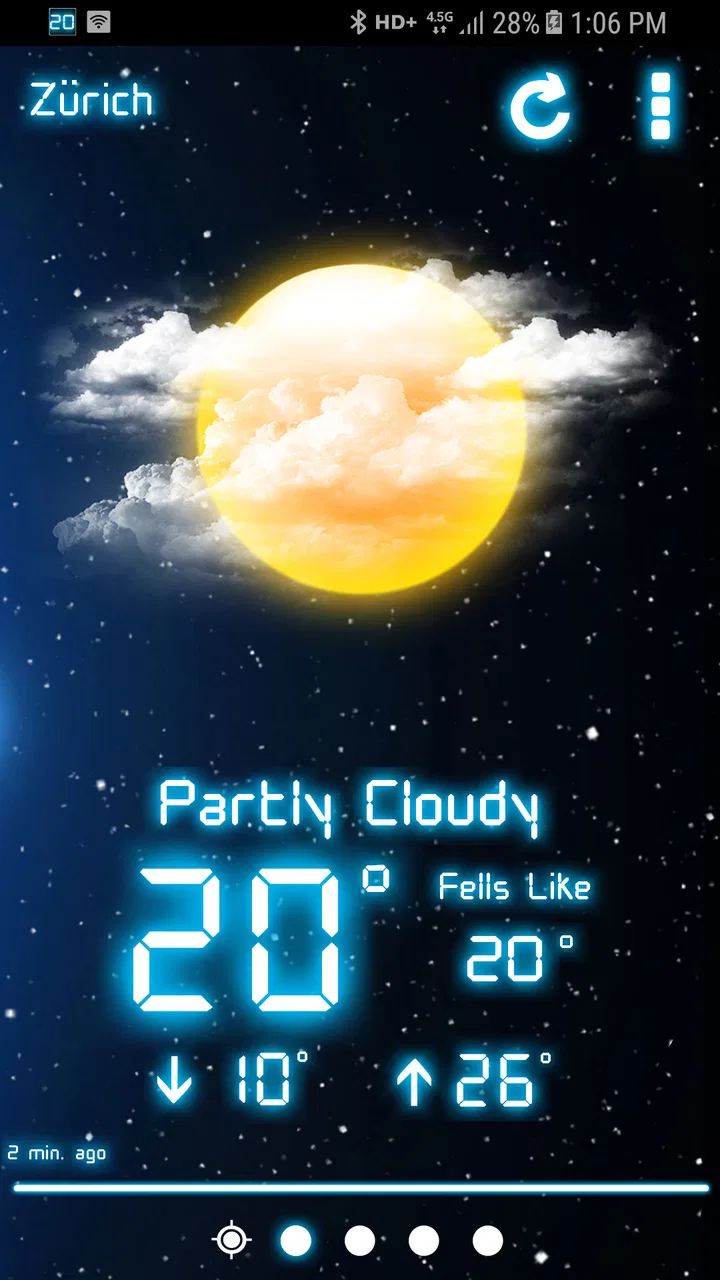
My first impression was shaped by the visual approach. The neon-inspired presentation gives ordinary forecast information a stronger identity, while the layout remains approachable enough for everyday checking. I could open it before leaving home, glance at the conditions, and move on without working through a dense set of charts. That makes it especially suitable for people who check the weather several times a day but do not want to study meteorological data.
There is also a useful distinction between what the app shows immediately and what it keeps tucked away. The obvious information is easy to reach, while the less obvious details encourage you to look around rather than assuming the first screen is all there is. The best reason to try Weather Neon is its combination of quick readability and discoverable detail. It is not merely a decorative weather screen, but it also avoids overwhelming the user at the start.
How Weather Neon feels in everyday use
I see this app working best as a small daily habit. Imagine getting ready for work or school on a morning when the sky looks clear through the window. Instead of relying on that first impression, I would open the app, check the current conditions, and look for anything that might affect the next part of the day. The process is fast enough for a rushed morning, yet the additional details are there when I need more confidence before heading out.
You May Also Like

 Blood Strike: 2.5 Anniversary
Blood Strike’s Loadouts Turn Every Drop Into a Tactical Gamble
A close look at Blood Strike’s custom loadouts: how fast access to signature weapons reshapes its battle royale rhythm, rewards preparation, and narrows the gap between fights.

 Pandora - Music & Podcasts
Pandora’s Music Is Easy to Start, but Harder to Recover
Pandora’s strength is its low-effort path from a seed to a station. Its weak spot is how much confidence it asks you to place in connection, setup, and quiet recovery.

 8 Ball Pool
 Is Built on Rivalries, Rematches, and Routine
A close look at the rivalries, rematches, shared routines, and unanswered safety questions that turn a quick pool match into a persistent mobile community.

 Samsung Music
’s Quiet Strength Is Playing What You Already Own
Its reach comes less from spectacle than from dependable access to a personal library. That simplicity is both the app’s strongest retention engine and its ceiling.

 AccuWeather: Weather Radar
AccuWeather Review: A Quick, Clear Forecast for Everyday Decisions
For everyday plans, the best forecast is the one you can understand quickly. AccuWeather makes rain timing, radar, and local conditions easy to act on, with a few trade-offs.

 Hill Climb Racing
Why Hill Climb Racing Still Turns Crashes Into One More Run
A tiny car, a bumpy hill and one more upgrade: Hill Climb Racing keeps resurfacing because its simple chaos makes every near-miss feel personal.
More From Our News Desk



That same workflow works before a walk, a commute, a shopping trip, or an outdoor appointment. I do not need a complicated forecast presentation for those decisions. I mainly need a clear view of what is happening and enough supporting information to decide whether to take a jacket, change the time of a walk, or prepare for uncomfortable conditions. Weather Neon’s design is well suited to that kind of repeated, practical check.
The visual style is more distinctive than the plain screens found in many default weather tools. That can make the app more enjoyable to open, particularly if you care about how an app looks as well as what it tells you. At the same time, the styling is not automatically an advantage for everyone. Users who prefer extremely restrained interfaces may find the neon character more noticeable than necessary, especially if they want weather information presented with no visual personality at all.
One detail I appreciated is that the app does not make its usefulness depend entirely on a dramatic feature list. The appeal comes from how it organizes ordinary weather information and adds layers of detail around it. That is a quieter strength than radar animations or extensive alert systems, but it matters when the app is used as a regular glanceable tool rather than a specialist forecasting workstation.
What the hidden details change
The phrase “hidden details” is important here because the app is more rewarding when I do not stop at the first visible reading. A practical way to use it is to spend a few minutes after installation exploring the screens and controls before judging it. That initial exploration helps reveal whether the information density suits you and prevents the common mistake of treating the opening view as the complete experience.
This also creates a useful trade-off. A newcomer may appreciate the uncluttered first impression but wonder where certain information has gone. Someone who enjoys exploring menus and presentation options may find that restraint inviting. In my experience, the app suits the second group particularly well: people who want a clean starting point but still like discovering small touches over time.
I would not describe those details as a substitute for professional weather analysis. They make the app more pleasant and potentially more informative for routine decisions, but they do not turn it into a dedicated tool for severe-weather monitoring, outdoor expedition planning, or technical forecasting. For those situations, I would use a service designed specifically around alerts, radar, or specialist maps, depending on the need.
Trust starts with clear expectations
Weather information affects small decisions, but it can also affect travel, work, health, and safety. That is why I would approach any weather app with a little more care than a purely decorative utility. Weather Neon earns some initial confidence from its straightforward purpose and focused presentation, yet I would still treat it as one source of information rather than an unquestionable authority.
The app has been available since Jun 23, 2017, and its current release is 5.1.2.GMS. It is free to install, with optional in-app purchases ranging from $1.99 to $8.99 per item. I think that model is reasonable for someone who wants to try the core experience before deciding whether any extra purchase is worthwhile. The important practical point is to explore the free version first instead of assuming that every visible detail requires payment.
Its audience is broad: the content rating is Everyone, and the minimum operating-system requirement is Android 9. That makes it a plausible option for people using an older but still supported Android phone, although compatibility alone does not guarantee that every device will feel equally smooth or that the visual presentation will look identical across screens.
Public interest also gives the app some useful context. It has passed 500 thousand installs and holds a 4.5 average from about 15 thousand ratings, alongside roughly 490 written reviews. I read those figures as evidence that many people have found the app worth keeping, not as proof that it will suit every location, device, or expectation. A high average can tell me that the overall experience is well received, while it cannot replace my own judgment about the interface and information I personally need.
Controls, choices, and the privacy questions I would ask
When I assess a weather app, I look for visible user choices before I settle into regular use. Can I understand what the app is asking me to do? Can I avoid enabling something I do not need? Can I tell which parts of the experience are essential and which are optional? With Weather Neon, I would make those decisions during setup and then revisit the app’s available controls rather than accepting every prompt automatically.
Location is the most obvious sensitive moment for a weather tool, because local forecasts are more useful when the app knows where the user is. I would decide whether convenience is worth allowing location access, or whether I prefer to select a place manually if that choice is offered on my device. I would also avoid granting broader access simply because an app is weather-related. The right approach is to give only the access needed for the way I intend to use it.
I would apply the same caution to notifications. Weather updates can be useful, but an alert that arrives at the wrong time becomes noise quickly. If the app presents notification choices, I would enable only the kinds of updates I genuinely want and silence the rest. This is a small but important part of user agency: a weather app should fit into my day rather than constantly interrupting it.
Account controls deserve similar attention. I would prefer to use a weather utility without creating an account unless an account is clearly necessary for a feature I value. If Weather Neon presents account-related choices, I would read them rather than registering automatically, and I would check the device settings if I later wanted to remove permissions or stop notifications. These are sensible habits for any app, particularly one that may handle location-related information.
I am deliberately careful not to treat a clean design as proof of a particular data practice. A polished interface can improve usability, but it does not by itself explain what information is collected, retained, or shared. For that reason, I would review the app’s current privacy disclosures and the permission screens shown on my own device before using location or other optional functions regularly. Those details can change with updates, while the visible choices on the phone are the controls I can act on immediately.
Moments when privacy matters most
The most privacy-sensitive use case is not necessarily the first launch; it is repeated location-aware use over time. If I open the app while traveling, at home, and at work, the pattern of places associated with weather checks may become more revealing than a single lookup. That does not mean I would avoid the app, but it does mean I would review location access and decide whether continuous convenience is necessary for my routine.
Travel is another moment that deserves thought. A traveler may want several destinations saved or may check conditions in places they do not normally visit. I would be comfortable looking up a destination manually when possible, but I would not assume that saving every place is harmless simply because the information is weather-related. Keeping the list limited to places I actually need would be a sensible compromise between convenience and control.
Notifications can also expose information on a locked screen. Even a short weather message may reveal where I am staying or which destination I am monitoring. I would therefore check the phone’s notification privacy settings and decide whether detailed previews should appear when the device is locked. This is not a criticism unique to Weather Neon; it is a practical step whenever an app can display location-specific updates.
Optional purchases create a different kind of user-control issue. Because the app is free but includes individual purchases, I would explore the basic experience first and make sure I understand what an optional item changes before paying. On a shared device, family account, or child-accessible phone, I would also use the operating system’s purchase protections. The Everyone rating does not remove the need for sensible payment controls.
Who will enjoy it, and who should look elsewhere
I would recommend Weather Neon to someone who wants a weather app with a recognizable visual style, a quick starting screen, and extra information to discover gradually. It is particularly appealing if your routine involves frequent short checks rather than long forecasting sessions. The app’s free entry point also makes it easy to see whether the presentation works for you before considering any optional purchase.
It may also suit users who find default weather apps too plain but do not want an overloaded replacement. The neon presentation gives the experience more character, while the hidden details provide a reason to keep exploring. For a person who enjoys customizing the feel of everyday utilities, that combination is more meaningful than a simple list of current conditions.
I would be more cautious about recommending it to someone who needs a specialist weather tool. If your decisions depend on advanced storm tracking, highly technical maps, or a dedicated warning workflow, I would compare it with an established service built around those functions. Weather Neon is better understood as a stylish everyday companion than as the only tool for high-stakes weather decisions.
I would also suggest skipping it if you strongly dislike visual effects or want every important detail visible immediately. The app’s charm depends partly on looking beyond the first screen. If you prefer a dense but completely transparent dashboard, another weather service may feel more efficient. Likewise, people who do not want to review location, notification, or purchase choices should not install any weather utility casually; those decisions are part of using this category responsibly.
How it compares with ordinary alternatives
The built-in weather app on a phone usually wins on convenience. It is already present, familiar, and often connected to the device’s existing location settings. If all I want is a fast temperature check and I do not care about presentation, the default option may be enough. Weather Neon becomes more interesting when I want the weather screen itself to feel considered rather than purely functional.
Large forecasting services often provide broader tools, including extensive maps, alerts, and layers of information aimed at different kinds of users. Those apps can be preferable for planning a long journey or following a developing weather system. Their weakness is that they may feel busy for a simple morning check. Weather Neon takes the opposite approach: it emphasizes an approachable visual experience and lets the smaller details reveal themselves through use.
That comparison helped me place the app accurately. I would not replace every weather source with it, but I could easily see it becoming my everyday first check, with a more specialized service available when conditions become important or uncertain. That two-app approach avoids asking one product to do everything and gives each tool a clearer job.
My cautious verdict after living with the idea
What I like most about Weather Neon is its sense of proportion. It gives weather information a distinct look without making the experience feel like a technical instrument panel. The less obvious details add depth, and the free installation makes experimentation straightforward. MobileRise has created an app that feels aimed at regular human use rather than at users who want to interpret every possible weather measurement.
My reservations are equally practical. The visual style will not appeal to everyone, and the discovery-based design may leave some users searching for information they expect to see immediately. I would also avoid relying on it alone for serious weather decisions, and I would take time to review permissions, notifications, account choices, and current privacy information before enabling anything beyond the basics.
Overall, I think Weather Neon is worth trying if you want a stylish weather app with useful details beneath a simple surface. Its 4.5 average and substantial install base suggest that the concept has connected with a sizeable audience, but the real test is personal: open it, explore the controls, check whether the information is clear on your phone, and decide whether the design helps your routine. For me, it works best as a pleasant daily weather companion, not as a replacement for every specialized forecast source.
FAQs for Weather Neon
01What is Weather Neon, and what does it offer?
Weather Neon is a weather application designed to present current conditions and forecasts in a visually attractive neon-style interface. It typically provides information such as temperature, weather description, humidity, wind, and forecast details for selected locations. Before downloading, users should check the app’s store listing to confirm the available forecast duration, supported regions, update frequency, and whether its visual themes or widgets require additional purchases.
02Does Weather Neon require location access to work?
Weather Neon may request permission to access your device location so it can automatically display weather conditions for your current area. You can usually deny this permission and add a city manually, although the exact options depend on the version installed and your operating system. If privacy is important to you, review the permission settings and the developer’s privacy policy before enabling location access.
03Is Weather Neon free to download and use?
The availability of free features, advertising, subscriptions, or one-time purchases can vary between Android and iOS versions. The basic weather information may be accessible without payment, while advanced themes, widgets, ad removal, or extra forecast tools could be restricted. Check the official download page for the current pricing details, in-app purchase information, and any trial or subscription conditions before installing.
04How accurate are the forecasts in Weather Neon?
Weather Neon’s forecast accuracy depends mainly on the weather data provider, your selected location, and how frequently the application updates its information. Like all weather apps, it should be treated as a useful guide rather than a guarantee, particularly for long-range predictions or rapidly changing conditions. For travel, outdoor activities, or severe weather, compare its alerts with official local weather services.
05Does Weather Neon work without an internet connection?
Weather Neon generally needs an internet connection to retrieve current conditions, refresh forecasts, load weather maps, and receive alerts. Some previously viewed information may remain temporarily available through cached data, but it can become outdated quickly and should not be relied upon offline. Users who frequently travel should verify whether the app supports offline access, background updates, or data-saving options on their device.
Pros
- Bright neon visuals make forecasts easy to scan.
- Includes useful current conditions and forecast details.
- Colorful interface gives the app a distinctive look.
- Quick access to weather information for daily planning.
- Appealing choice for users who enjoy themed weather apps.
Cons
- Neon styling may feel distracting to users who prefer minimal designs.
- Some forecast details may require extra navigation to find.
- Visual effects could affect battery life on older devices.
- Accuracy depends on the quality of available weather data.
- May offer fewer advanced tools than dedicated weather services.

Weather Neon
Gallery